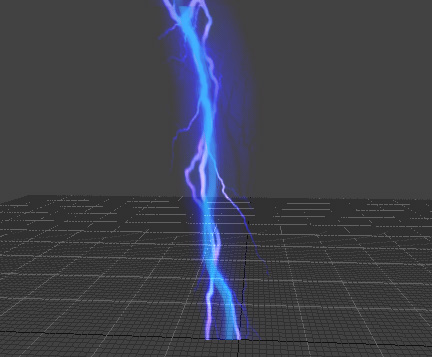
This effect is a textured polygon with separate length and widths values. Used for creating laser beams and similar effects.
Arc: Arcing is based on world orientation and allows you to arc a beam effect between two points. Can be animated.
Blending: Determines the kind of transparency that the Beam effect will render with. Possible values are:
No blending
Alpha blend
Additive blend
Multiply blend
AdditiveAlpha(AA)
Colour: Determines the colour of the Beam effect. This is in RGBA format (alpha channel included). Note that the alpha has to be set manually. Values closer to 0 for alpha will make the effect more ‘transparent’. Can be animated.
Detail_From: The effect is displayed from this detail level to the Detail_To detail level.
Detail_To; The effect is displayed to this detail level from the Detail_From detail level.
Duration: Determines the duration of the effect. Possible values 0.001 to 30.
Length: Length of the beam effect. Beam length must be set to 1 if you intend to transform the beam between two entities in the game. Beam length can be varied over time using they keyframe editing window. Can be animated.
LengthEpsilon: Possible values are 0 to 1. Determines the randomness of the beams length.
LineDistance: Determines the distance at which the beam is replaced with a vectored line. Used to keep beams from sparkling from at far viewing distance.
Loop: Determines if the beam effect will loop.
Noise: Amount of noise added to the beam. The amount of noise present in a beam can be varied over time using the keyframe editing window. This setting will disperse the beam, causing it to jiggle. Can be animated.
Offset: The Offset in X Y Z space from (0,0,0).
Segments: Amount of segments in the beam effect. Possible values are from 1 to 10, and can be determined over time using the keyframe editing window. The amount of segments determines how much detail your arcing and noise settings will reproduce.
SelfIlluminated: Makes the beam self lit (100% luminance), thus receiving no lighting from the game.
Texture: Determines the texture to use for the beam effect.
Texture_U_Offset: The offset of the texture. Possible values are 0 to 10. Determines where the texture will be offset to on the beam. Can be animated.
Texture_U_Repeat: The number of times the texture is repeated on the beam. Possible values are 0 to 100. Can be animated.
Width: Width of the beam effect, can be modified over time using the keyframe editing window. Can be animated.
WidthEpsilon: Possible values are 0to 1. Determines the randomness of the beams width.
WidthAlignAxis: If set to non-zero values the axis will be adjusted to align the axis in worldspace.